Author: Robert Krzaczynski

MMS • Robert Krzaczynski
The .NET Upgrade Assistant team has recently introduced a significant upgrade: the Central Package Management (CPM) feature. This new capability enables .NET developers to manage dependencies more effectively, streamlining the upgrade process and maintaining consistency across various projects within a solution. The tool is available as a Visual Studio extension and a command-line interface (CLI), making it easier for developers to transition to CPM and stay updated with the latest .NET versions.
The addition of support for Centralized Package Management in the .NET Upgrade Assistant responds to the community’s need for enhanced package management solutions. A few months ago, a Reddit user shared their experience with the tool:
I used it professionally in several WPF apps, and it has worked great. The only remaining issue I had to fix was sorting out NuGet packages.
To upgrade to CPM using Visual Studio, developers can right-click a project in Solution Explorer and select the Upgrade option, then choose the CPM feature. The upgrade process allows for the selection of additional projects in the solution, promoting centralized management of package versions. Furthermore, users can enable transitive pinning for consistent dependency management and specify the centralized path for package storage.
Source: Microsoft Blog
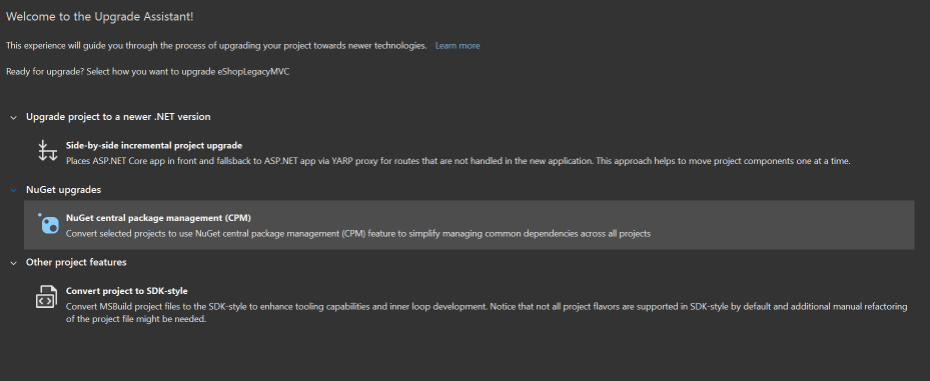
For those who prefer command-line operations, the CLI also supports upgrading to CPM. By navigating to the solution directory in Command Prompt and executing upgrade-assistant upgrade, developers can select the projects they wish to upgrade and straightforwardly confirm their CPM settings.
Upon completion of the CPM upgrade, the .NET Upgrade Assistant consolidates package versions into a single Directory.packages.props file. This change significantly reduces redundancy and simplifies dependency tracking across projects. The tool has also improved dependency discovery by editing references directly in central files.
The introduction of CPM has received positive feedback from the community. For example, Alexander Ravenna wrote:
This sounds incredibly useful! We have a solution with dozens of projects, and central package management could help us manage version upgrades a lot more easily!
The latest update for Upgrade Assistant now requires Visual Studio version 17.3 or higher, changing from the previous minimum of 17.1. This update is necessary for security reasons, so users with versions below 17.3 should upgrade. As a result, Upgrade Assistant will no longer work with versions older than 17.3.
MMS • Robert Krzaczynski
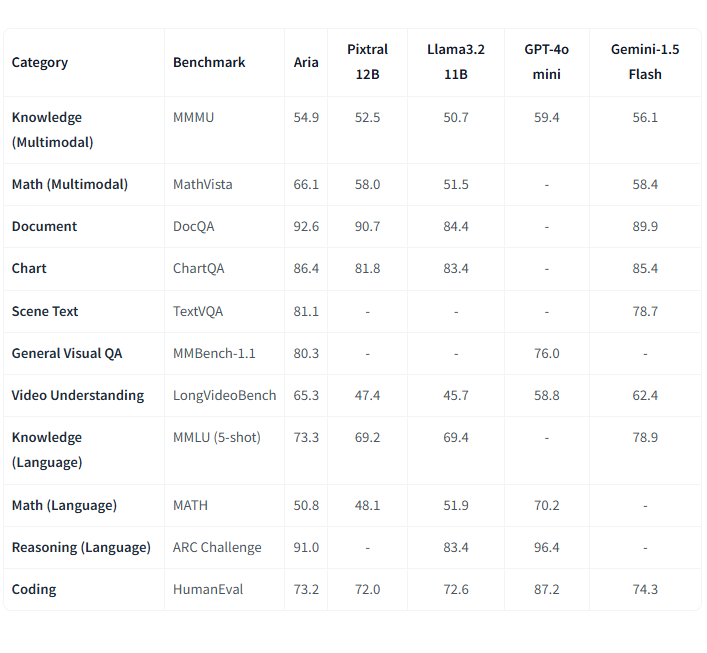
Rhymes AI has introduced Aria, an open-source multimodal native Mixture-of-Experts (MoE) model capable of processing text, images, video, and code effectively. In benchmarking tests, Aria has outperformed other open models and demonstrated competitive performance against proprietary models such as GPT-4o and Gemini-1.5. Additionally, Rhymes AI has released a codebase that includes model weights and guidance for fine-tuning and development.
Aria has several features, including multimodal native understanding and competitive performance against existing proprietary models. Rhymes AI has shared that Aria’s architecture, built from scratch using multimodal and language data, achieves state-of-the-art results across various tasks. This architecture includes a fine-grained mixture-of-experts model with 3.9 billion activated parameters per token, offering efficient processing with improved parameter utilization.
Rashid Iqbal, a machine learning engineer, raised considerations regarding Aria’s architecture:
Impressive release! Aria’s Mixture-of-Experts architecture and novel multimodal training approach certainly set it apart. However, I am curious about the practical implications of using 25.3B parameters with only 3.9B active—does this lead to increased latency or inefficiency in certain applications?
Also, while beating giants like GPT-4o and Gemini-1.5 on benchmarks is fantastic, it is crucial to consider how it performs in real-world scenarios beyond controlled tests.
In benchmarking tests, Aria has outperformed other open models, such as Pixtral-12B and Llama3.2-11B, and performs competitively against proprietary models like GPT-4o and Gemini-1.5. The model excels in areas like document understanding, scene text recognition, chart reading, and video comprehension, underscoring its suitability for complex, multimodal tasks.
Source: https://huggingface.co/rhymes-ai/Aria
In order to support development, Rhymes AI has released a codebase for Aria, including model weights, a technical report, and guidance for using and fine-tuning the model with various datasets. The codebase also includes best practices to streamline adoption for different applications, with support for frameworks like vLLM. All resources are made available under the Apache 2.0 license.
Aria’s efficiency extends to its hardware requirements. In response to a community question about the necessary GPU for inference, Leonardo Furia explained:
ARIA’s MoE architecture activates only 3.5B parameters during inference, allowing it to potentially run on a consumer-grade GPU like the NVIDIA RTX 4090. This makes it highly efficient and accessible for a wide range of applications.
Addressing a question from the community about whether there are plans to offer Aria via API, Rhymes AI confirmed that API support is on the roadmap for future models.
With Aria’s release, Rhymes AI encourages participation from researchers, developers, and organizations in exploring and developing practical applications for the model. This collaborative approach aims to further enhance Aria’s capabilities and explore new potential for multimodal AI integration across different fields.
For those interested in trying or training the model, it is available for free at Hugging Face.
MMS • Robert Krzaczynski
JetBrains announced a significant change to its licensing model for Rider, making it free for non-commercial use. Users can now access Rider at no cost for non-commercial activities, including learning, open-source project development, content creation, or personal projects. This update aims to enhance accessibility for developers while commercial clients will still need to obtain a paid license.
In order to take advantage of the new non-commercial subscription, installing Rider is necessary. Upon opening the program for the first time, a license dialog box will appear. At that point, the option for non-commercial use should be selected, followed by logging in to an existing JetBrains account or creating a new one. Finally, acceptance of the terms of the Toolbox Subscription Agreement for Non-Commercial Use is required.
Developers asked whether the non-commercial license for Rider would be “free forever or for a limited time.” JetBrains clarified that the non-commercial license is available indefinitely. Users will receive a one-year license that automatically renews, allowing them to use Rider for non-commercial projects without interruption.
Furthermore, several questions have arisen regarding the licensing details. One concern came from user MrX, who asked how the licensing applies to game development:
How does that work if someone is making a game with it? Can they technically use it for years and only need to start a subscription if they’ve actually released something to sell?
In response, JetBrains explained that any user planning to release a product with commercial benefits, whether immediately or in the future, should use a commercial license.
Another community member, Pravin Chaudhary, shared doubts about changing project intentions:
Plans can change, no? I may have a side project that I will make commercial only if it gets enough traction. How to handle such a case?
JetBrains addressed this by stating that users would need to reevaluate their licensing status if their project goals shift from non-commercial to commercial.
Following the announcement, community feedback has been positive. Many developers have expressed excitement about the implications of this licensing change. Matt Eland, a Microsoft MVP in AI and .NET, remarked:
This changes the paradigm for me as someone supporting cross-platform .NET, particularly as someone writing .NET books primarily from a Linux operating system. I now have a lot more comfort in including Rider screenshots in my content now that I can easily point people to this as a free non-commercial tool.
For more information about this licensing change, users can visit the official JetBrains website.
MMS • Robert Krzaczynski

OpenAI launched the public beta of the Realtime API, offering developers the ability to create low-latency, multimodal voice interactions within their applications. Additionally, audio input/output is now available in the Chat Completions API, expanding options for voice-driven applications. Early feedback highlights limited voice options and response cutoffs, similar to ChatGPT’s Advanced Voice Mode.
The Realtime API enables real-time, natural speech-to-speech interactions using six preset voices, combining speech recognition and synthesis into a single API call. This simplifies the development of fluid conversational applications by streamlining what previously required multiple models.
OpenAI has also extended the capabilities of its Chat Completions API by adding support for audio input and output. This feature is geared towards use cases that do not require the low-latency performance of the Realtime API, allowing developers to send either text or audio inputs and receive responses in text, audio, or both.
In the past, creating voice assistant experiences required using multiple models for different tasks, such as automatic speech recognition, text inference, and text-to-speech. This often resulted in delays and lost nuance. The Realtime API addresses these issues by streamlining the entire process into a single API call, offering faster and more natural conversational capabilities.
The Realtime API is powered by a persistent WebSocket connection, allowing for continuous message exchange with GPT-4o. It also supports function calling, enabling voice assistants to perform tasks such as placing orders or retrieving relevant user data to provide more personalized responses.
Additionally, the community observed that although the API is accessible through the Playground, the available voice options are currently limited to alloy, echo, and shimmer. During testing, users noticed that the responses were subject to the same limitations as ChatGPT’s Advanced Voice Mode. Despite attempts to use detailed system messages, the responses were still cut off, hinting at the involvement of a separate model managing the flow of conversations.
The Realtime API is available in public beta for all paid developers. Audio in the Chat Completions API will be released in the coming weeks. Pricing for the Realtime API includes both text and audio tokens, with audio input priced at approximately $0.06 per minute and audio output at $0.24 per minute.
There have been concerns about how this pricing could impact long-duration interactions. Some developers pointed out that due to the way the model processes conversations, where every response involves revisiting prior exchanges, costs can accumulate quickly. This has led to thoughts about value, especially for extended conversations, given that large language models do not retain short-term memory and must reprocess prior content.
Developers can begin exploring the Realtime API by checking the official documentation and the reference client.
NVIDIA Unveils NVLM 1.0: Open-Source Multimodal LLM with Improved Text and Vision Capabilities
MMS • Robert Krzaczynski
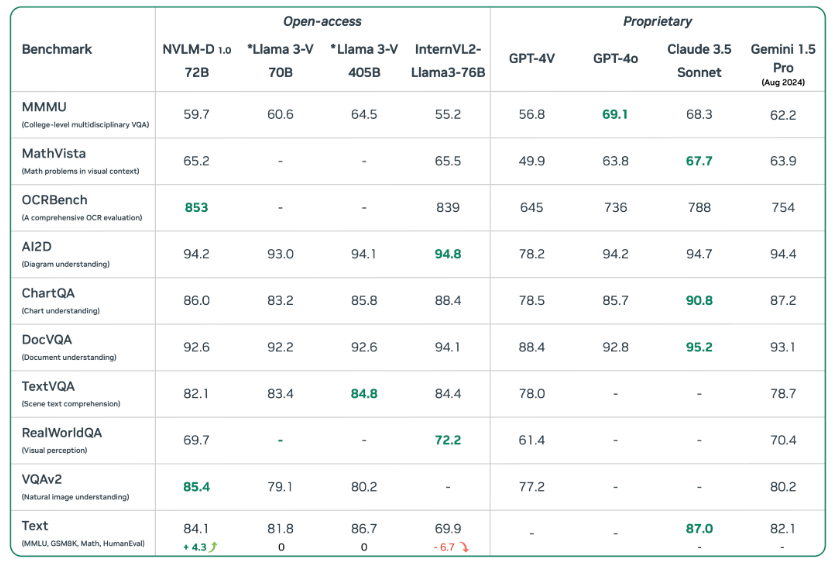
NVIDIA unveiled NVLM 1.0, an open-source multimodal large language model (LLM) that performs on both vision-language and text-only tasks. NVLM 1.0 shows improvements in text-based tasks after multimodal training, standing out among current models. The model weights are now available on Hugging Face, with the training code set to be released shortly.
NVLM 1.0 has been evaluated against proprietary and open-access multimodal models and performs well on both vision-language and text-only tasks. In particular, the NVLM-1.0-D 72B model shows an average 4.3-point improvement in accuracy on math and coding tasks after multimodal training. This contrasts with models like InternVL2-Llama3-76B, which lose performance in text-only tasks following multimodal training. The text improvements seen in NVLM suggest that its architecture manages multimodal data effectively without undermining its original language abilities.
Source: https://nvlm-project.github.io/
The NVLM-1.0-D 72B model is not just about text. It handles a wide range of multimodal tasks. These include object localization, reasoning, OCR (optical character recognition), and even coding tasks based on visual inputs. The model can interpret complex scenarios, such as understanding visual humor or answering location-sensitive questions in images. Its ability to perform mathematical reasoning based on handwritten pseudocode, as well as its handling of other multimodal inputs, highlights the breadth of tasks it can manage.
User Imjustmisunderstood reflected on NVLM’s potential for deeper understanding:
Extending tokenization to more ‘senses’ exponentially increases dimensionality. I would be fascinated to see whether the latent space recognizes the common temporal dimension in different modalities.
This touches on the broader implications of working with multimodal data, suggesting that models like NVLM could offer new ways of connecting different types of information.
Overall, NVLM 1.0 got very positive feedback from the community. For example, Luênya dos Santos, shared the following thoughts:
NVIDIA’s NVLM-D-72B is a huge leap in AI innovation. NVIDIA’s decision to open-source the model is a game-changer, giving smaller teams access to cutting-edge technology and pushing the boundaries of AI development! Really exciting news.
John McDonald added:
By making the model weights publicly available and promising to release the training code, Nvidia breaks from the trend of keeping advanced AI systems closed.
NVLM 1.0 is available for the AI community as an open-source AI model, with model weights accessible through Hugging Face. The training code will be released soon, allowing for further exploration of the model’s capabilities.
Microsoft Releases Prompty: New VS Code Extension for Integrating LLMs into .NET Development
MMS • Robert Krzaczynski
Microsoft released a new Visual Studio Code extension called Prompty, designed to integrate Large Language Models (LLMs) like GPT-4o directly into .NET development workflows. This free tool aims to simplify the process of adding AI-driven capabilities to applications. The official release post includes a practical example demonstrating how Prompty can be used in real-world scenarios.
Prompty is available for free on the Visual Studio Code Marketplace and offers .NET developers an intuitive interface to interact with LLMs. Whether creating chatbots, generating content, or enhancing other AI-driven functionalities, Prompty provides an easy way to integrate these capabilities into existing development environments.
While Prompty has been well-received for its innovative approach to integrating AI into .NET development, some community members have expressed concerns about its availability. On LinkedIn, Jordi Gonzalez Segura expressed disappointment that Prompty is not accessible to those using Visual Studio Professional.
Using Prompty in Visual Studio Code involves several steps:
- Installation: Developers start by installing the Prompty extension from the Visual Studio Code Marketplace.
- Setup: After installation, users configure the extension by providing API keys and setting up necessary parameters to connect to the LLM, such as GPT-4o.
- Integration: Prompty integrates into the development workflow by allowing users to create new files or modify existing ones with embedded prompts. Commands and snippets are provided to easily insert prompts and handle responses from the LLM.
- Development: Developers can write prompts directly in the codebase to interact with the LLM. Prompty supports various prompt formats and offers syntax highlighting, making it easier to read and maintain prompts. These prompts help in generating code snippets, creating documentation, or troubleshooting by querying the LLM for specific issues.
- Testing: Prompty enables rapid iteration and testing, allowing developers to refine prompts to improve response accuracy and relevance.
Bruno Capuano, a principal cloud advocate at Microsoft, prepared a real-world use case demonstrating how Prompty can enhance a .NET WebAPI project. In this example, Prompty generates detailed weather forecast descriptions, transforming the standard output into richer and more engaging content. Developers can dynamically produce detailed weather summaries by defining prompts within a .prompty file and setting up the necessary configurations to interact with the LLM. This practical application leverages the Semantic Kernel to automate the generation of descriptive text, improving the quality and informativeness of the application’s output.
Additional information about Prompty, its features, and integration into development workflows can be found on the Prompty Visual Studio Code extension page or in the Prompty source code available on GitHub.
MMS • Robert Krzaczynski

Ubuntu 24.04 has launched with a .NET release available from day one in the official Ubuntu feeds, making it immediately usable. Container images for .NET 8+ are available, including noble, noble-chiseled, and noble-chiseled-extra flavors. Additionally, .NET 6 and 7 are accessible through the dotnet/backports repository. Microsoft and Canonical are collaborating on servicing and support, ensuring simultaneous availability of .NET fixes.
For the first time, a .NET release is available from day one in the official Ubuntu feeds. Previously, .NET 6 was added to Ubuntu 22.04 a few months post-release. From Ubuntu 24.04 onwards, Ubuntu feeds are the official source of .NET packages. The .NET installation documentation has been updated accordingly. Ubuntu 24.04 container images for .NET 8+ are now available, including noble, noble-chiseled, and noble-chiselled-extra image flavours.
In order to install .NET 8 on Ubuntu 24.04:
$ sudo apt update && sudo apt install -y dotnet-sdk-8.0
Below the official post, a question appeared asking if there is any plan to have this easy way to install/update NET8+ on Raspberry Pis. Richard Lander, a product manager at Microsoft, answered:
I usually just curl and tar the tar.gz from the download page.
The install scripts also work great.
Separately, we’ve talked to a few different folks about getting .NET into Debian (which would help with Raspberry Pi OS). We haven’t been able to make that happen. It is certainly something that would be very nice.
Important: .NET 8 works on Debian Arm32. It doesn’t work on Ubuntu 24.04 Arm32 – context.
.NET 6 and 7 are available in the Ubuntu .NET backports package repository, maintained by Canonical. To install .NET 6 using the dotnet/backports repository:
$ sudo add-apt-repository ppa:dotnet/backports
$ sudo apt install -y dotnet-sdk-6.0
.NET 7 can be installed using the same pattern, with the dotnet/backports repository only needing to be registered once.
Another question was regarding the possibility of installing .NET 6 & .NET 8 side-by-side. Thomas Glaser mentioned that he attempted to add the MS repository and install both, but got a bunch of conflicts somehow. The answer was the following:
I recommend not using the MS repository. We’ve come to the conclusion that Microsoft and Canonical both publishing the same packages doesn’t work. Your experience is evidence of that, sadly. Here’s a doc that describes how to resolve that.
The post describes how to install .NET 8 (from the archives) and .NET 6 (from a PPA).
Microsoft and Canonical are collaborating on servicing and support. Microsoft provides security and functional fixes to Canonical ahead of Patch Tuesday releases via a private channel, allowing time for building and testing. A similar process is followed with Red Hat. The goal is to ensure that .NET fixes are available simultaneously everywhere.
ASP.NET Core Updates in .NET 9 Preview 4: Support for OpenAI Doc Generation, HybridCache and More
MMS • Robert Krzaczynski

Microsoft released .NET 9 Preview 4 which contains features regarding ASP.NET Core: built-in support for OpenAPI document generation, HybridCache API, and adding static SSR pages to a globally-interactive Blazor Web app. There is also an improvement implemented to avoid 503 errors during an app recycle in IIS.
The OpenAPI specification is a standard for describing HTTP APIs, enabling integration with client and server generators, testing tools, and documentation. In .NET 9 Preview 4, ASP.NET Core includes built-in support for generating OpenAPI documents for both controller-based and minimal APIs using the Microsoft.AspNetCore.OpenApi package. To take advantage of this feature, the mentioned package should be installed in the relevant web project.
dotnet add package Microsoft.AspNetCore.OpenApi --prerelease
ASP.NET Core’s built-in OpenAPI document generation includes support for customizations such as document and operation transformers and the ability to manage multiple OpenAPI documents for a single application. More information about these capabilities is available in the Microsoft.AspNetCore.OpenApi documentation.
Furthermore, .NET 9 Preview 4 introduces the new HybridCache API, addressing gaps in the existing IDistributedCache and IMemoryCache APIs and adding features such as “stampede” protection and configurable serialization. HybridCache uses a multi-tier cache storage system, combining a limited in-process cache with a larger out-of-process cache. This approach provides data retrieval from the in-process cache while preventing backend overload for less frequently accessed data. HybridCache is designed to be a drop-in replacement for most IDistributedCache scenarios.
HybridCache includes support for older .NET runtimes down to .NET Framework 4.7.2 and .NET Standard 2.0.
Blazor Web apps can enable global interactivity, allowing all pages in the app to use an interactive render mode: Server, WebAssembly, or Auto. Pages can now opt out of this global interactivity using the new [ExcludeFromInteractiveRouting] attribute. This attribute causes navigations to the page to exit from interactive routing, forcing a full-page reload. Consequently, the top-level App.razor will re-run, enabling a switch to a different top-level render mode.
In order to avoid 503 errors during an app recycle in IIS, a default one-second delay is now implemented between IIS notification and ASP.NET Core Module (ANCM) initiation of server shutdown. This delay minimizes race conditions between queuing requests to the new app and rejecting requests to the old app. For slower or CPU-heavy machines, adjusting the delay duration via the ANCM_shutdownDelay environment variable or the shutdownDelay handler setting is recommended.
Further details on the new features in this preview can be found in the release notes.
ASP.NET Core Updates in .NET 9 Preview 4: Support for OpenAI Doc Generation, HybridCache and More
MMS • Robert Krzaczynski

Microsoft released .NET 9 Preview 4 which contains features regarding ASP.NET Core: built-in support for OpenAPI document generation, HybridCache API, and adding static SSR pages to a globally-interactive Blazor Web app. There is also an improvement implemented to avoid 503 errors during an app recycle in IIS.
The OpenAPI specification is a standard for describing HTTP APIs, enabling integration with client and server generators, testing tools, and documentation. In .NET 9 Preview 4, ASP.NET Core includes built-in support for generating OpenAPI documents for both controller-based and minimal APIs using the Microsoft.AspNetCore.OpenApi package. To take advantage of this feature, the mentioned package should be installed in the relevant web project.
dotnet add package Microsoft.AspNetCore.OpenApi --prerelease
ASP.NET Core’s built-in OpenAPI document generation includes support for customizations such as document and operation transformers and the ability to manage multiple OpenAPI documents for a single application. More information about these capabilities is available in the Microsoft.AspNetCore.OpenApi documentation.
Furthermore, .NET 9 Preview 4 introduces the new HybridCache API, addressing gaps in the existing IDistributedCache and IMemoryCache APIs and adding features such as “stampede” protection and configurable serialization. HybridCache uses a multi-tier cache storage system, combining a limited in-process cache with a larger out-of-process cache. This approach provides data retrieval from the in-process cache while preventing backend overload for less frequently accessed data. HybridCache is designed to be a drop-in replacement for most IDistributedCache scenarios.
HybridCache includes support for older .NET runtimes down to .NET Framework 4.7.2 and .NET Standard 2.0.
Blazor Web apps can enable global interactivity, allowing all pages in the app to use an interactive render mode: Server, WebAssembly, or Auto. Pages can now opt out of this global interactivity using the new [ExcludeFromInteractiveRouting] attribute. This attribute causes navigations to the page to exit from interactive routing, forcing a full-page reload. Consequently, the top-level App.razor will re-run, enabling a switch to a different top-level render mode.
In order to avoid 503 errors during an app recycle in IIS, a default one-second delay is now implemented between IIS notification and ASP.NET Core Module (ANCM) initiation of server shutdown. This delay minimizes race conditions between queuing requests to the new app and rejecting requests to the old app. For slower or CPU-heavy machines, adjusting the delay duration via the ANCM_shutdownDelay environment variable or the shutdownDelay handler setting is recommended.
Further details on the new features in this preview can be found in the release notes.
New MSTest SDK: Usage of MSTest Runner Extensions, Support Running Tests in Native AOT
MMS • Robert Krzaczynski
Microsoft announced the new MSTest SDK built on top of the MSBuild Project SDK system. This SDK improves the experience of testing with MSTest. There are such features as easier usage of MSTest Runner extensions, support running tests in Native AOT mode and better default suggestions.
To get started with MSTest SDK, it is needed to create a MSTest project (or update an existing one) and replace the content of the .csproj file. It is possible to use any target framework supported by MSTest.
net8.0
One of the advantages of MSTest SDK is easier usage of MSTest Runner extensions. To help a developer select the right extensions or control updates and alignments between the extensions, Microsoft introduced a new concept of “profiles”. The new SDK provides three profiles: Default, AllMicrosoft and None.
Using MSTest SDK assures developers that their test project is aligned with the patterns that are provided by the main types of applications such as ASP.NET Core, Razor or Windows Desktop. It will use the default suggestions that the MSTest team makes for the test projects.
Furthermore, MSTest supports running tests in Native AOT mode. When using the MSTest SDK, it will be automatically detected if developers are publishing to AOT. All required test suites and configurations will be transparently changed to fit this specialized mode. More information about testing with Native AOT is available here.
Below the official announcement appeared a question if there is an easy way to support running tests both with and without native AOT. Amaury Levé, a senior software engineer at Microsoft, answered:
Yes. MSTest SDK is the perfect fit for such a use case. By simply providing the PublishAot MSBuild property, we would change all needed references for you. So you can easily do 2 calls to the test execution command (dotnet test, dotnet exec, dotnet run or calling the exe), one with and the other without the property.
Microsoft community also asked about support for testing WASM. Amaury Leve mentioned that there is work on the framework engine and it is in the phase of testing. There is a threat about this topic on GitHub.
The MSTest SDK documentation is available on the Microsoft website.